> For the complete documentation index, see [llms.txt](https://help.ringtonic.app/llms.txt). Markdown versions of documentation pages are available by appending `.md` to page URLs; this page is available as [Markdown](https://help.ringtonic.app/guides/webhooks.md).
# Webhooks
Webhooks let you receive real-time notifications when events happen in Ring Tonic. Instead of polling our API, we push data to your server the moment a call comes in, a recording is ready, or a lead is qualified.
{% hint style="info" %}
Webhooks are available on the **Agency plan** only. Perfect for CRM integrations like GoHighLevel, HubSpot, and Zapier.
{% endhint %}
***
### Available Events
| Event | Description |
| ---------------------------- | -------------------------------------------------------------------- |
| `call.started` | Fires when a call starts ringing |
| `call.completed` | Fires when a call ends (includes duration and status) |
| `call.missed` | Fires when a call is missed (busy, no-answer, failed) |
| `recording.available` | Fires when call recording is ready |
| `transcription.available` | Fires when call transcription is complete |
| `lead.qualified` | Fires when you qualify a lead in the dashboard |
| `call.blocked` | Fires when a blocked number attempts to call |
| `voicemail.received` | Fires when a caller leaves a voicemail |
| `voicemail.transcribed` | Fires when voicemail transcription is complete |
| `appointment.booked` | Fires when an appointment is booked |
| `appointment.rescheduled` | Fires when an appointment's time is changed |
| `appointment.cancelled` | Fires when an appointment is cancelled |
| `appointment.status_changed` | Fires when an appointment is marked completed / no-show, or reverted |
Appointment events fire for both AI-booked and manually-booked appointments — see [Appointments](/guides/appointments.md).
{% hint style="warning" %}
**`call.started` fires before any screening.** It is sent the moment a call reaches your tracking number, which is before the spam filter has had a chance to check whether the caller is a real person — so robocalls trigger it too.
If you only want your CRM to hear about verified callers, put a **Webhook** node after the Spam Filter in a call flow instead. It runs only on the passed branch, and it can send the same attribution the caller arrived with. See [Send only real callers to your CRM](/guides/call-flow-builder.md#recipes-real-world-flow-patterns).
{% endhint %}
{% hint style="info" %}
**Forms vs. webhooks:** Webhooks fire for **call and appointment events**. The website tracker script also injects attribution data (UTMs, click IDs, `ga_client_id`, `ga_session_id`) into your website's forms as hidden fields — but that data is sent to *your* form handler (HubSpot, Squarespace, your CRM, etc.), not back to Ring Tonic. There is no `form.submitted` webhook.
{% endhint %}
***
### Attribution Fields in Call Payloads
Every call payload includes a nested `visitor_session` object with the full attribution context captured by the website tracker script when the caller's session was created.
{% hint style="warning" %}
**Where to find GA fields:** `ga_client_id` and `ga_session_id` live inside `data.visitor_session`, **not** at the top level of `data`. Only `utm_source` and `utm_medium` are promoted to the top level for convenience.
{% endhint %}
| Field | Description |
| --------------------------------------- | ---------------------------------------------- |
| `data.visitor_session.gclid` | Google Ads click ID |
| `data.visitor_session.gbraid` | Google iOS app click ID |
| `data.visitor_session.wbraid` | Google privacy-restricted web click ID |
| `data.visitor_session.fbclid` | Facebook/Instagram click ID |
| `data.visitor_session.msclkid` | Microsoft/Bing click ID |
| `data.visitor_session.ttclid` | TikTok click ID |
| `data.visitor_session.li_fat_id` | LinkedIn click ID |
| `data.visitor_session.ga_client_id` | Google Analytics Client ID (from `_ga` cookie) |
| `data.visitor_session.ga_session_id` | GA4 Session ID (from `_ga_XXXXXX` cookie) |
| `data.visitor_session.utm_campaign` | Campaign name from URL |
| `data.visitor_session.utm_term` | Search term from URL |
| `data.visitor_session.utm_content` | Ad variant/content from URL |
| `data.visitor_session.referrer_url` | The referring page that brought the visitor |
| `data.visitor_session.landing_page_url` | The first page the visitor landed on |
If the caller could not be matched to a website visitor session (e.g., they dialed the number directly without visiting your site), `data.visitor_session` will be `null`.
***
### Timestamps & Time Zones
Every timestamp in a webhook payload is in **UTC** (Coordinated Universal Time), formatted as an [ISO 8601](https://en.wikipedia.org/wiki/ISO_8601) string ending in `+00:00` — for example, `2026-06-09T07:25:37+00:00`. The trailing `+00:00` is the time-zone offset, and it confirms the value is UTC.
{% hint style="warning" %}
**Webhook times are UTC; your dashboard shows local time.** Your call logs and analytics pages convert times into your campaign or workspace time zone so they're easy to read, but webhooks always send UTC. A time that looks an hour (or more) different from your dashboard is the **same moment shown in two time zones** — not a mismatch.
{% endhint %}
For example, a call that starts at `07:25 UTC` arrives in the webhook as `2026-06-09T07:25:37+00:00`. If that campaign uses UK time, the call's detail page shows it as **8:25 AM**, because the UK runs one hour ahead of UTC during British Summer Time (UTC+1). Both values are correct — they describe the same instant.
#### Timestamp fields
| Field | Where it appears |
| ------------------------------- | ---------------------------------------------------------------------------------- |
| `created_at` | Top level — when the webhook event was generated |
| `data.started_at` | All call events — when the call started |
| `data.qualified_at` | `lead.qualified` — when the lead was qualified |
| `data.summarized_at` | `transcription.available` and `lead.qualified` — when the AI summary was generated |
| `data.voicemail.transcribed_at` | `voicemail.transcribed` — when the voicemail was transcribed |
{% hint style="success" %}
**Working with the times:** Because each timestamp carries the `+00:00` offset, most date libraries parse it correctly out of the box. Convert it to your preferred time zone for display, or store it as UTC and convert on read.
{% endhint %}
***
### Creating a Webhook Endpoint
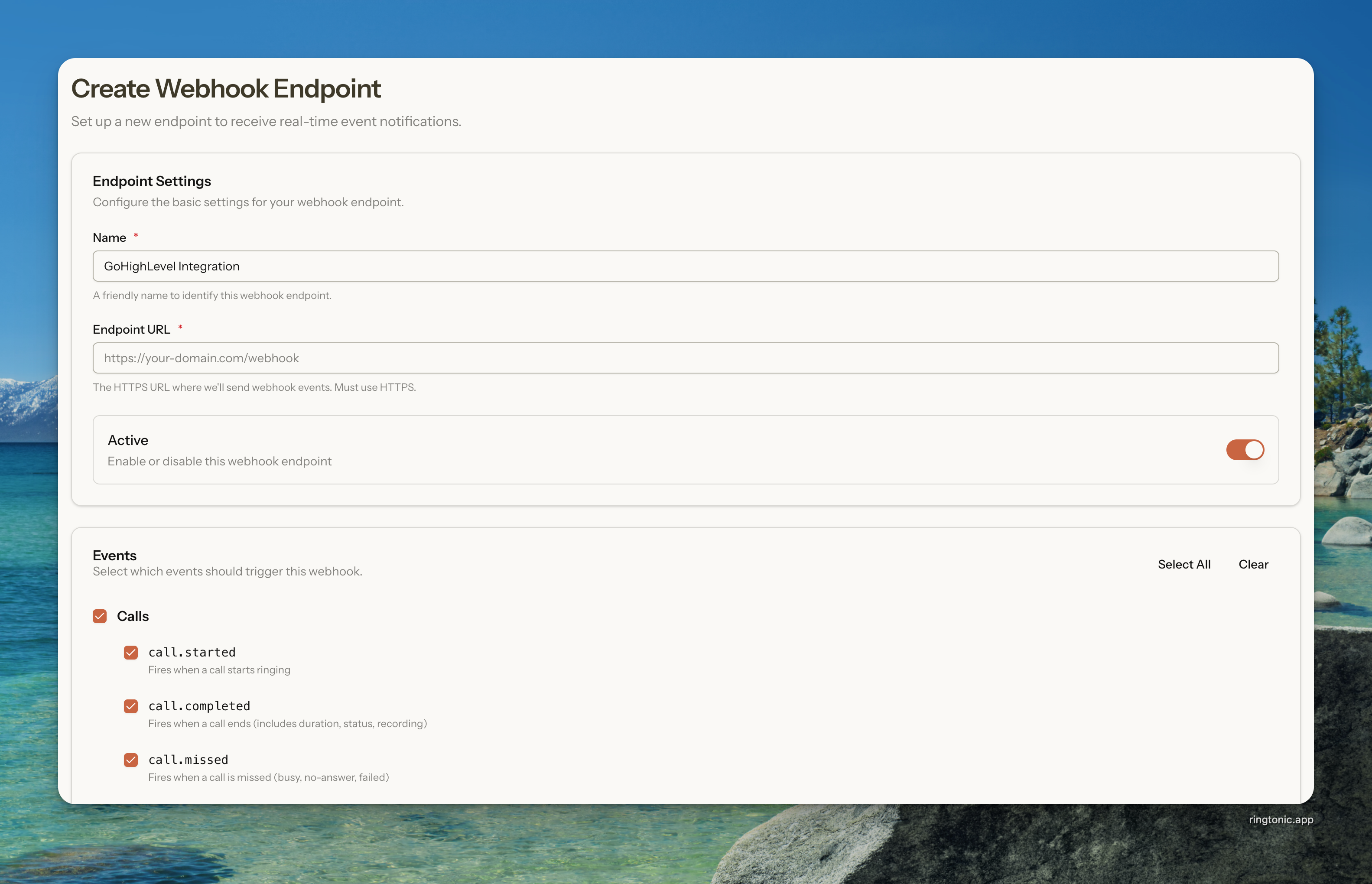
Create a webhook endpoint form
1. Go to **Automations > Webhooks** in the sidebar
2. Click **Add Endpoint**
3. Fill in the endpoint details:
* **Name:** A friendly name (e.g., "GoHighLevel Integration")
* **Endpoint URL:** Your HTTPS URL that will receive the webhook
* **Events:** Select which events to subscribe to
4. Click **Create Endpoint**
{% hint style="warning" %}
**HTTPS Required:** Your endpoint URL must use HTTPS. HTTP URLs are not accepted for security reasons.
{% endhint %}
***
### Signing Secret
Each webhook endpoint has a unique signing secret (e.g., `whsec_abc123...`). Use this to verify that requests are genuinely from Ring Tonic.
We sign every webhook request using HMAC-SHA256. The signature is included in the `Signature` header.
#### Verifying Signatures (PHP Example)
```php
$payload = file_get_contents('php://input');
$signature = $_SERVER['HTTP_SIGNATURE'];
$secret = 'whsec_your_secret_here';
$expectedSignature = hash_hmac('sha256', $payload, $secret);
if (!hash_equals($expectedSignature, $signature)) {
http_response_code(401);
exit('Invalid signature');
}
// Process the webhook...
```
{% hint style="success" %}
**Pro Tip:** You can regenerate your signing secret anytime from the Edit page if you suspect it's been compromised.
{% endhint %}
***
### Testing Your Endpoint
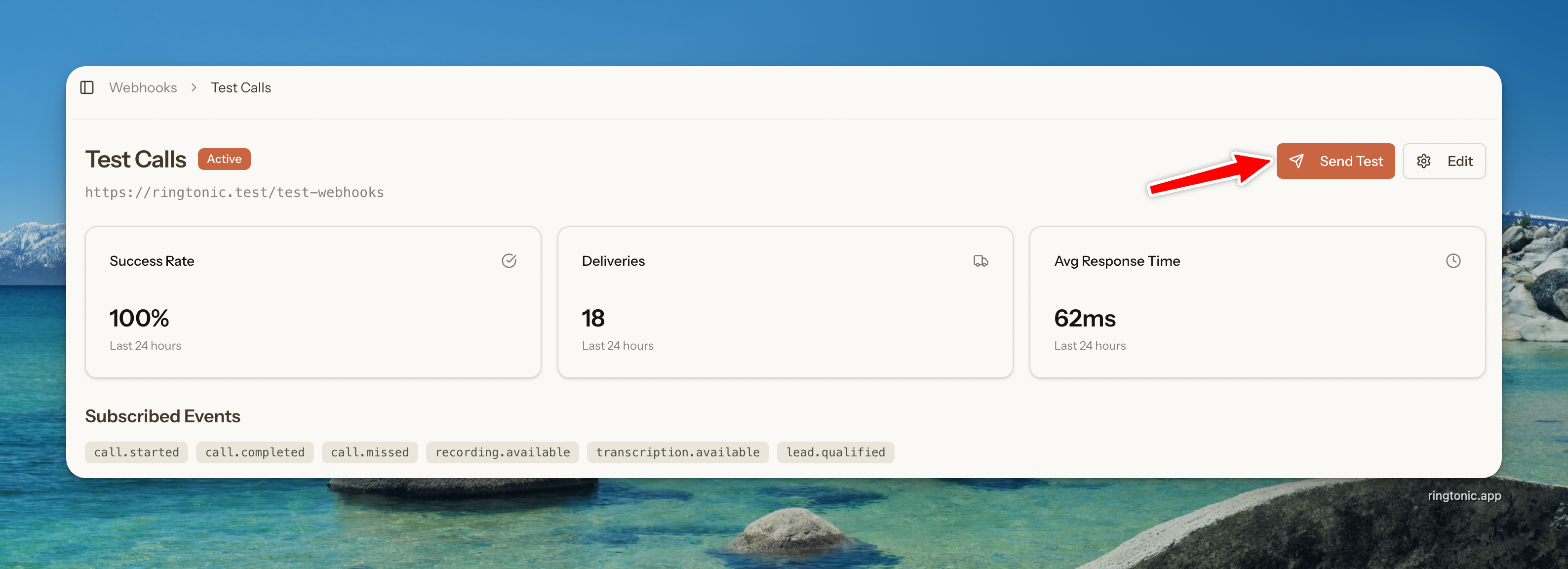
1. Go to your webhook endpoint's detail page
2. Click **Send Test**
3. Select an event type from the dropdown (only events you're subscribed to are shown)
4. Click **Send Test** to dispatch a sample webhook with realistic data
5. Check your server logs for the test payload
6. Verify the delivery status in the **Recent Deliveries** table
{% hint style="info" %}
**Realistic Sample Data:** Test webhooks include sample data that matches the real payload structure for each event type. This helps you test your integration logic before real calls come in.
{% endhint %}
Test a webhook endpoint
***
### Payload Examples
All webhooks follow the same structure with event-specific data in the `data` object.
call.blocked
Fires when a call from a blocked number is rejected. This event has a different payload structure than other call events since the call is never connected.
```json
{
"event": "call.blocked",
"created_at": "2026-01-15T14:30:00+00:00",
"workspace": {
"id": 1,
"name": "My Workspace"
},
"data": {
"blocked_number": "+15551234567",
"called_number": "+15559876543",
"caller_name": "John Spam",
"caller_city": "San Francisco",
"caller_state": "CA",
"block_list_type": "workspace",
"block_reason": "spam",
"tracking_number": {
"id": 1,
"phone_number": "+15559876543",
"friendly_name": "Sales Line"
},
"campaign": {
"id": 1,
"name": "Google Ads Campaign"
}
}
}
```
call.completed (base payload — shared by all call.* events)
This is the full base payload shared by `call.started`, `call.completed`, `call.missed`, `recording.available`, `transcription.available`, `lead.qualified`, `voicemail.received`, and `voicemail.transcribed`. Event-specific fields are appended on top (see the sections below).
```json
{
"event": "call.completed",
"created_at": "2026-01-15T14:30:00+00:00",
"workspace": {
"id": 1,
"name": "My Workspace"
},
"data": {
"call_log_id": 12345,
"twilio_call_sid": "CA1234567890abcdef",
"from_number": "+14155551234",
"caller_name": "John Smith",
"tracking_number": "+18005551234",
"tracking_number_name": "Google Ads - Main",
"campaign_id": 42,
"campaign_name": "Google Ads Campaign",
"status": "completed",
"duration": 145,
"caller_location": {
"city": "San Francisco",
"state": "CA",
"country": "US",
"zip": "94102"
},
"is_first_time_caller": true,
"utm_source": "google",
"utm_medium": "cpc",
"visitor_session": {
"gclid": "CjwKCAiA-sample-gclid-123",
"gbraid": null,
"wbraid": null,
"fbclid": null,
"msclkid": null,
"ttclid": null,
"li_fat_id": null,
"ga_client_id": "1234567890.1234567890",
"ga_session_id": "1234567890",
"utm_campaign": "winter-sale-2026",
"utm_term": "plumber near me",
"utm_content": "ad-variant-a",
"referrer_url": "https://www.google.com/search?q=plumber+near+me",
"landing_page_url": "https://example.com/services/plumbing"
},
"started_at": "2026-01-15T14:27:35+00:00"
}
}
```
recording.available
Includes all base fields plus:
```json
{
"event": "recording.available",
"data": {
"recording_url": "https://api.twilio.com/recordings/RE123...",
// ... all base call data
}
}
```
transcription.available
Includes all base fields plus:
```json
{
"event": "transcription.available",
"data": {
"transcription": "Hi, I'm calling about your services...",
"transcription_confidence": 0.95,
"summary": "Customer called inquiring about services and pricing. Requested a callback.",
"summarized_at": "2026-01-15T14:32:00+00:00"
// ... all base call data
}
}
```
lead.qualified
Includes all base fields plus:
```json
{
"event": "lead.qualified",
"data": {
"lead_status": "qualified",
"qualification_reason": "Customer interested in premium package",
"qualification_confidence": 0.89,
"deal_value": 2500.00,
"qualified_at": "2026-01-15T15:00:00+00:00",
"tags": ["High Intent", "New Customer", "Service Inquiry"],
"summary": "Customer called inquiring about services and pricing. Requested a callback.",
"summarized_at": "2026-01-15T14:32:00+00:00"
// ... all base call data
}
}
```
voicemail.received
Fires when a caller leaves a voicemail. Includes all base fields plus:
```json
{
"event": "voicemail.received",
"data": {
"voicemail": {
"recording_url": "https://api.twilio.com/recordings/RE456...",
"duration": 15
},
// ... all base call data
}
}
```
voicemail.transcribed
Fires when a voicemail transcription is complete. Includes all base fields plus:
```json
{
"event": "voicemail.transcribed",
"data": {
"voicemail": {
"recording_url": "https://api.twilio.com/recordings/RE456...",
"duration": 15,
"transcription": "Hi, this is John. I missed your call and wanted to learn more about your services. Please call me back when you get a chance. Thanks!",
"transcribed_at": "2025-01-15T14:32:00+00:00"
},
// ... all base call data
}
}
```
***
### Delivery & Retries
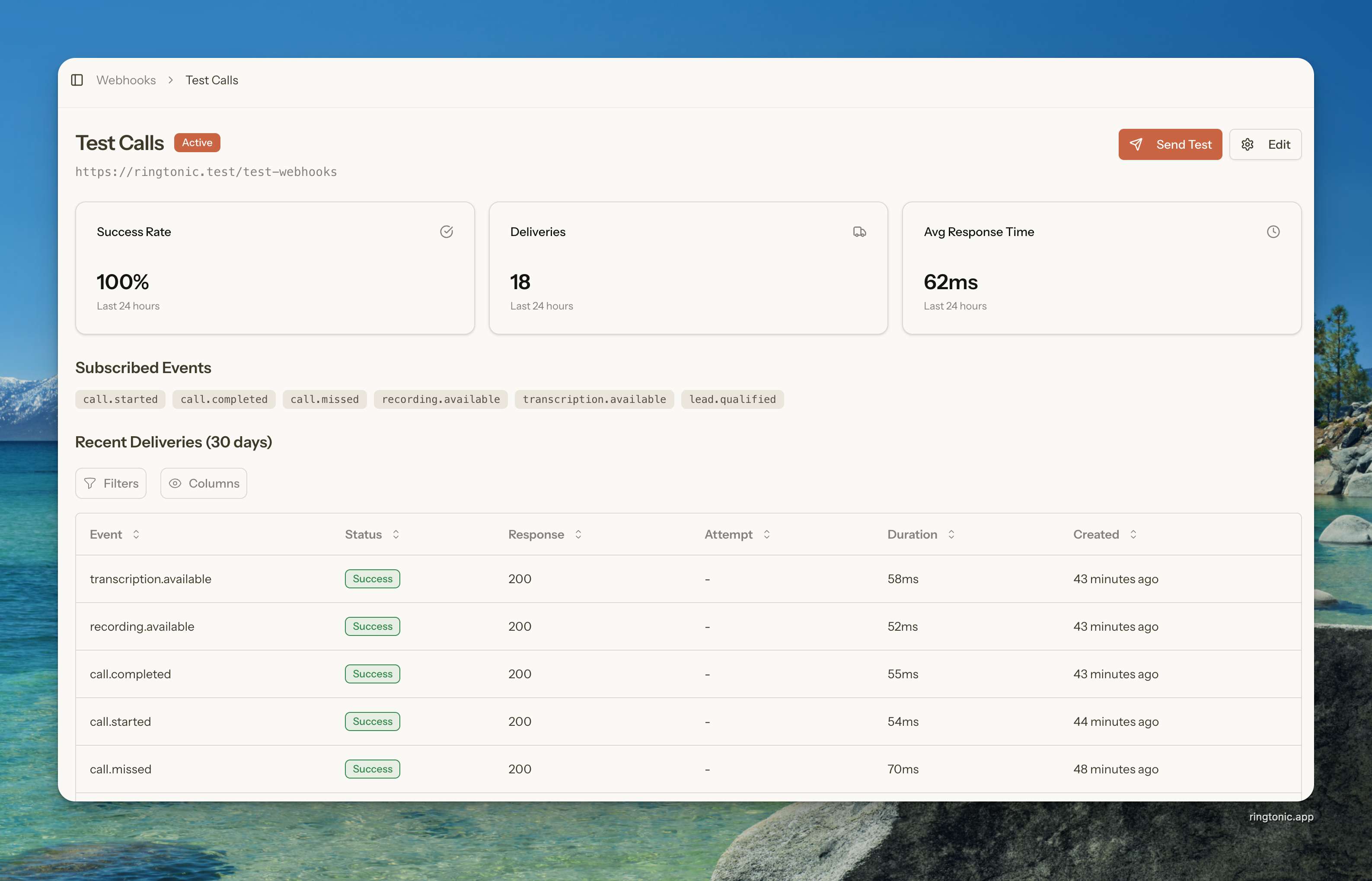
Ring Tonic automatically retries failed deliveries with exponential backoff. You can monitor delivery status from the endpoint detail page:
* **Success:** Your server returned 2xx
* **Retrying:** Delivery failed, retrying automatically
* **Failed:** All retry attempts exhausted
{% hint style="danger" %}
**Circuit Breaker:** After 10 consecutive failures, the endpoint is automatically disabled to prevent further issues. Re-enable it from the detail page after fixing the problem.
{% endhint %}
#### Manual Retry
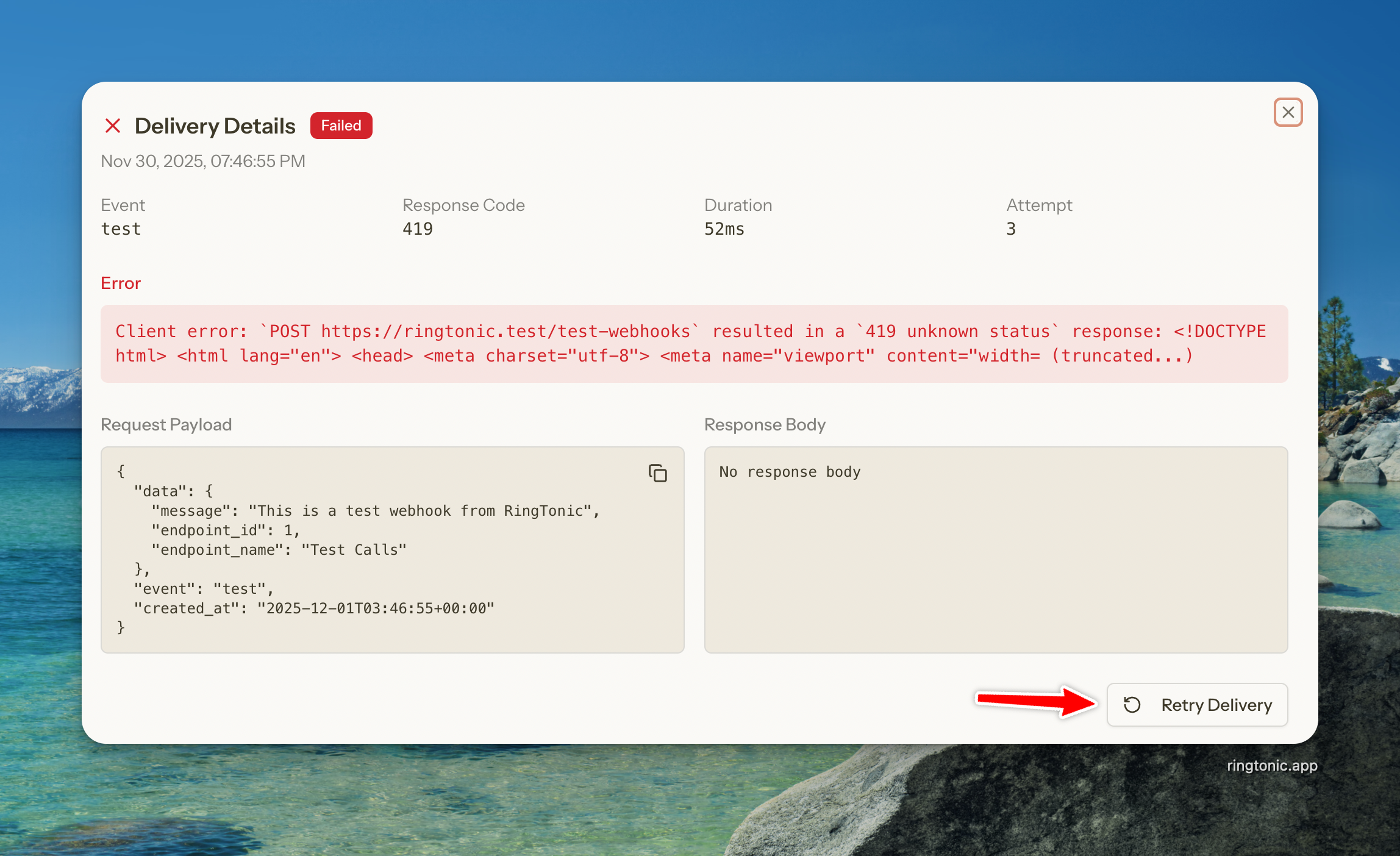
For failed deliveries, click the **Retry** button in the delivery detail modal to manually queue a retry.
Manual retry a webhook delivery
***
### Integration Example: GoHighLevel
This example shows how to connect Ring Tonic with GoHighLevel (GHL) to automatically create contacts and trigger automations when calls come in.
#### How It Works
```
┌─────────────┐ ┌─────────────┐ ┌─────────────┐
│ Caller │──────│ Ring Tonic │──────│ GHL │
│ dials │ │ tracks & │ │ creates │
│ tracking # │ │ attributes │ │ contact & │
│ │ │ the call │ │ triggers │
│ │ │ │ │ automation │
└─────────────┘ └─────────────┘ └─────────────┘
```
1. **Ring Tonic handles inbound calls** - Your tracking number lives in Ring Tonic. We record the call and attribute the source (Google Ads, SEO, etc.) which GHL can't do natively.
2. **Ring Tonic pushes data to GHL** - When a call ends, we fire a webhook to GHL with full call details and attribution data.
3. **GHL automations fire** - Your GHL workflow creates the contact, adds tags (e.g., "PPC Lead"), and triggers SMS/email follow-ups.
{% stepper %}
{% step %}
**Create the GHL Workflow**
* In GoHighLevel, go to **Automation** → **Workflows**
* Click **Create Workflow** → **Start from Scratch**
* Click **Add New Trigger** → Select **Inbound Webhook**
* Copy the generated **Webhook URL** (you'll need this for Ring Tonic)
* Click **Save Trigger**
{% hint style="success" %}
For more details, see [GHL's Inbound Webhook documentation](https://help.gohighlevel.com/support/solutions/articles/155000003147-workflow-trigger-inbound-webhook).
{% endhint %}
{% endstep %}
{% step %}
**Create the Ring Tonic Endpoint**
* In Ring Tonic, go to **Automations > Webhooks** → **Add Endpoint**
* Enter a name: `GoHighLevel Integration`
* Paste the GHL Webhook URL from Step 1
* Select events: `call.completed`, `call.missed` (and optionally `recording.available`)
* Click **Create Endpoint**
{% endstep %}
{% step %}
**Test the Connection**
* In Ring Tonic, click **Send Test** on your new endpoint
* Back in GHL, your workflow should show the test data received
* You can now map the incoming fields to GHL contact fields
{% endstep %}
{% step %}
**Build the GHL Workflow**
After the Inbound Webhook trigger, add these actions:
* **Create/Update Contact**
* Phone: `{{data.from_number}}`
* First Name: (optional, or use a placeholder)
* Tags: Add tags based on campaign, e.g., `{{data.campaign_name}}`
* **Add to Campaign/Sequence** (optional)
* Enroll the contact in a follow-up sequence
* **Send SMS** (optional)
* "Thanks for calling! We'll be in touch shortly."
{% endstep %}
{% endstepper %}
#### Field Mapping Reference
| Ring Tonic Field | GHL Use Case |
| --------------------------------------- | ---------------------------------------------------------------- |
| `data.from_number` | Contact Phone |
| `data.caller_name` | Contact Name |
| `data.campaign_name` | Contact Tag or Custom Field |
| `data.utm_source` | Lead Source |
| `data.utm_medium` | Custom Field (e.g., "ppc", "organic") |
| `data.caller_location.city` | Contact City |
| `data.caller_location.state` | Contact State |
| `data.is_first_time_caller` | Tag: "New Caller" vs "Repeat Caller" |
| `data.duration` | Custom Field (call length in seconds) |
| `data.recording_url` | Custom Field (link to recording) |
| `data.visitor_session.gclid` | Custom Field (Google Ads click ID for offline conversion upload) |
| `data.visitor_session.fbclid` | Custom Field (Facebook click ID for CAPI conversions) |
| `data.visitor_session.ga_client_id` | Custom Field (stitch the call to a GA4 session) |
| `data.visitor_session.utm_campaign` | Custom Field (campaign name) |
| `data.visitor_session.landing_page_url` | Custom Field (entry page) |
{% hint style="success" %}
**Pro Tip:** Use `is_first_time_caller` to branch your workflow. Send a welcome message to new callers and a "thanks for calling again" to repeat callers.
{% endhint %}
***
### Common Questions
Why do webhook times differ from the times in my dashboard?
Webhook timestamps are always in **UTC** — you'll see `+00:00` at the end of each time. Your dashboard, call logs, and analytics convert times into your campaign or workspace time zone so they're easier to read.
So a call delivered as `07:25 UTC` in the webhook can appear as `08:25` on the call detail page if the campaign is on a time zone that's an hour ahead — for example, UK time during British Summer Time.
It's the same moment shown two ways, so nothing is wrong. See the **Timestamps & Time Zones** section above for the full list of timestamp fields and how to convert them.
What HTTP method is used?
All webhooks are sent as `POST` requests with a JSON body. The `Content-Type` header is set to `application/json`.
How many times will you retry a failed delivery?
Each delivery is retried up to 3 times with exponential backoff. After all retries are exhausted, that delivery is marked as failed. If 10 consecutive deliveries fail (each after exhausting retries), the endpoint is automatically disabled via circuit breaker.
How quickly are webhooks sent?
Webhooks are dispatched immediately when the event occurs, typically within seconds.
What response should my server return?
Return any 2xx status code (200, 201, 204, etc.) to acknowledge receipt. We ignore the response body.
How long do you store delivery logs?
Delivery logs are retained for 30 days.
Can I have multiple endpoints for the same event?
Yes, you can create multiple endpoints subscribing to the same events. Each will receive the webhook independently.