> For the complete documentation index, see [llms.txt](https://help.ringtonic.app/llms.txt). Markdown versions of documentation pages are available by appending `.md` to page URLs; this page is available as [Markdown](https://help.ringtonic.app/guides/blocked-numbers.md).
# Blocked Numbers
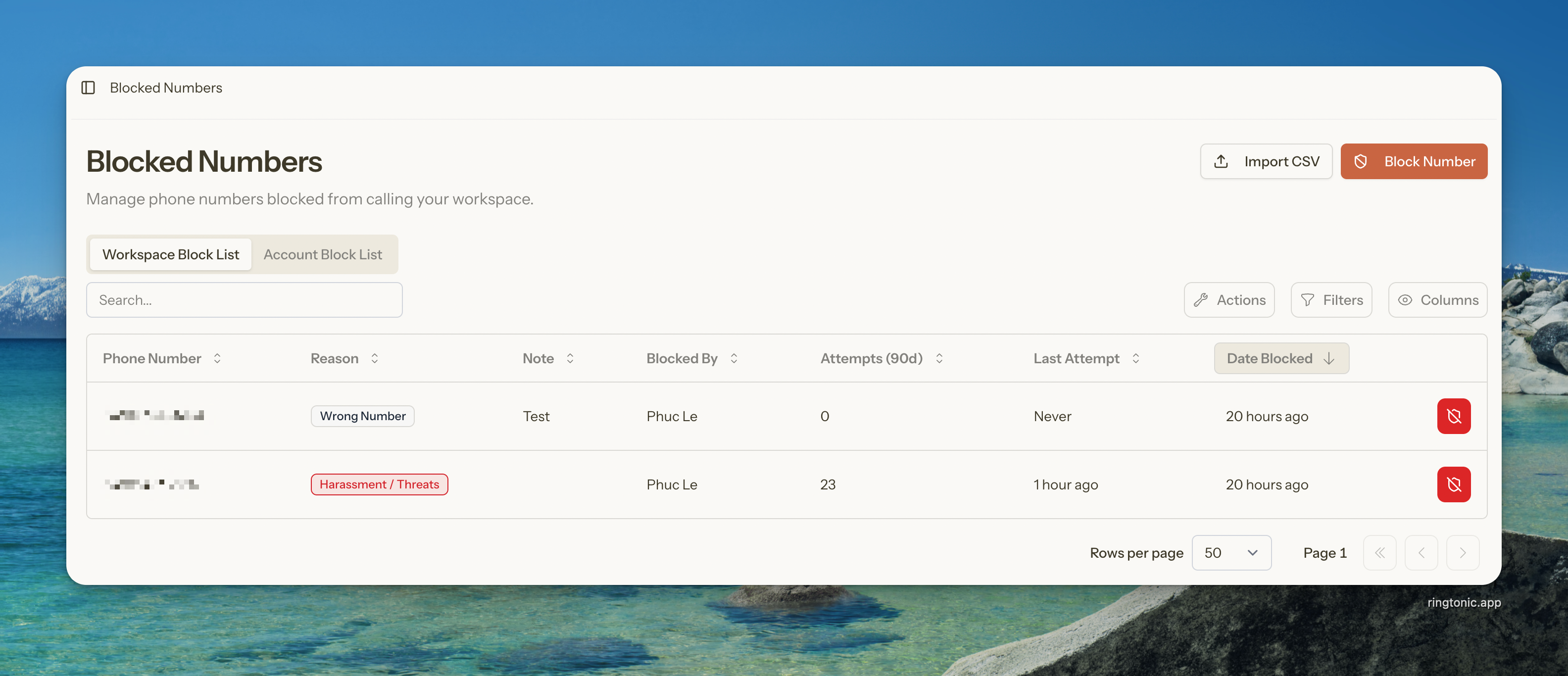
Blocked numbers management page
Blocked numbers let you prevent specific phone numbers from calling your tracking numbers. When a blocked number calls, it is silently rejected — no ring, no charge, no call log clutter.
{% hint style="info" %}
Blocked numbers are available on **all plans** (Indie and Agency). There is no limit on how many numbers you can block.
{% endhint %}
***
## How It Works
When someone calls your tracking number, Ring Tonic checks the block list **before** connecting the call. If the caller is blocked, the call is instantly rejected and logged as a blocked attempt. The caller hears nothing — no ringing, no voicemail.
Blocked calls:
* Do **not** appear in your call logs
* Do **not** count toward your call usage
* Are logged separately as blocked attempts (retained for 90 days)
* Trigger a `call.blocked` webhook if configured
***
## Two-Tier Block Lists
Ring Tonic supports two levels of blocking:
| Level | Scope | Who can manage |
| ------------- | ---------------------------------------------- | -------------------- |
| **Workspace** | Blocks a number in the current workspace only | Any workspace member |
| **Account** | Blocks a number across **all** your workspaces | Workspace owner only |
{% hint style="info" %}
The **Account Block List** tab only appears if you own more than one workspace. If you have a single workspace, only the workspace-level list is shown.
{% endhint %}
When a call comes in, Ring Tonic checks **both** lists. If the caller appears on either the workspace block list or the account block list, the call is rejected.
***
## Blocking a Number
{% stepper %}
{% step %}
**Open Blocked Numbers**
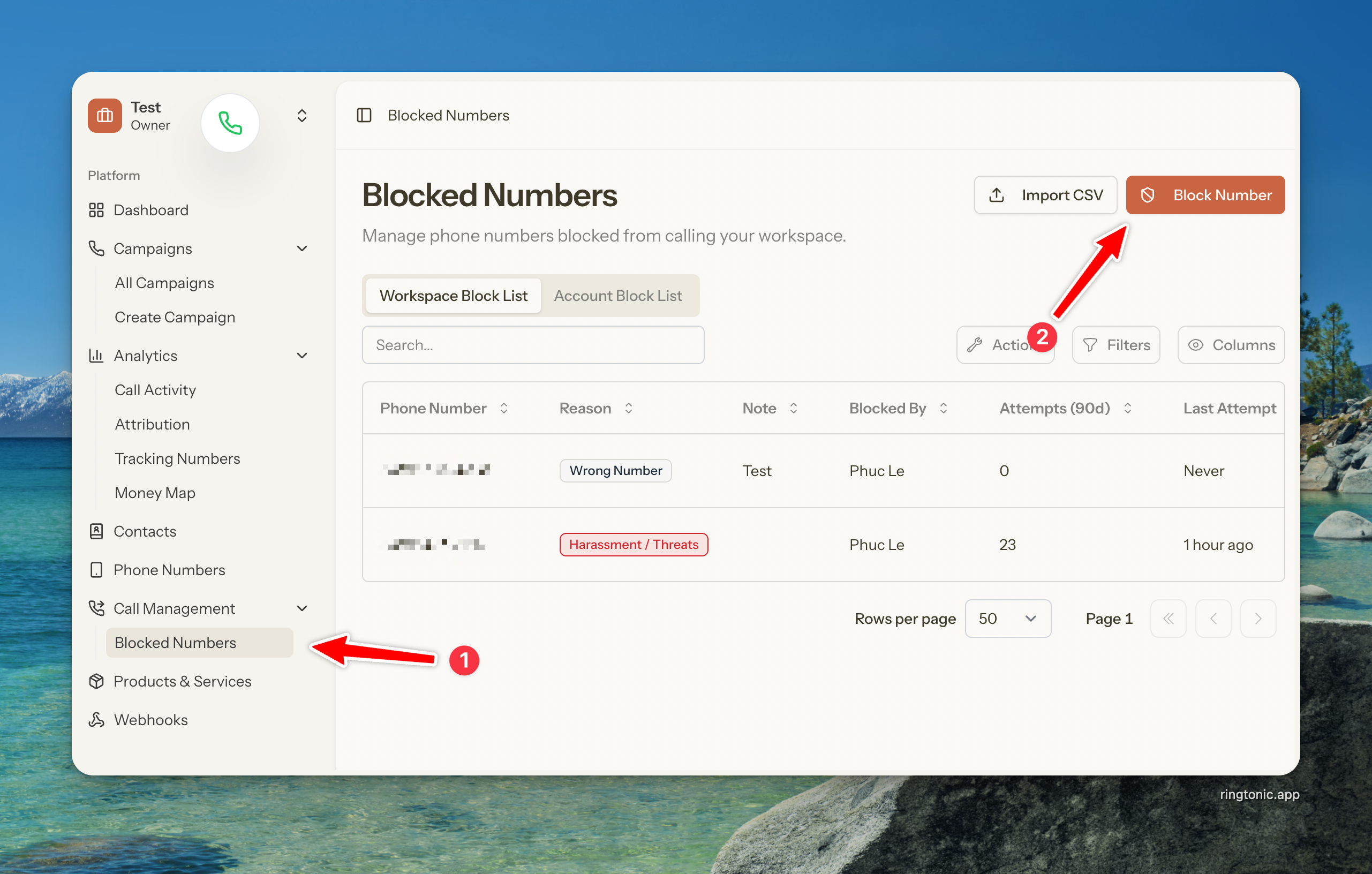
Navigate to **Blocked Numbers** in the sidebar.
Blocked numbers page with Block Number button
{% endstep %}
{% step %}
**Click Block Number**
Click the **Block Number** button in the top-right corner.
{% endstep %}
{% step %}
**Fill In the Details**
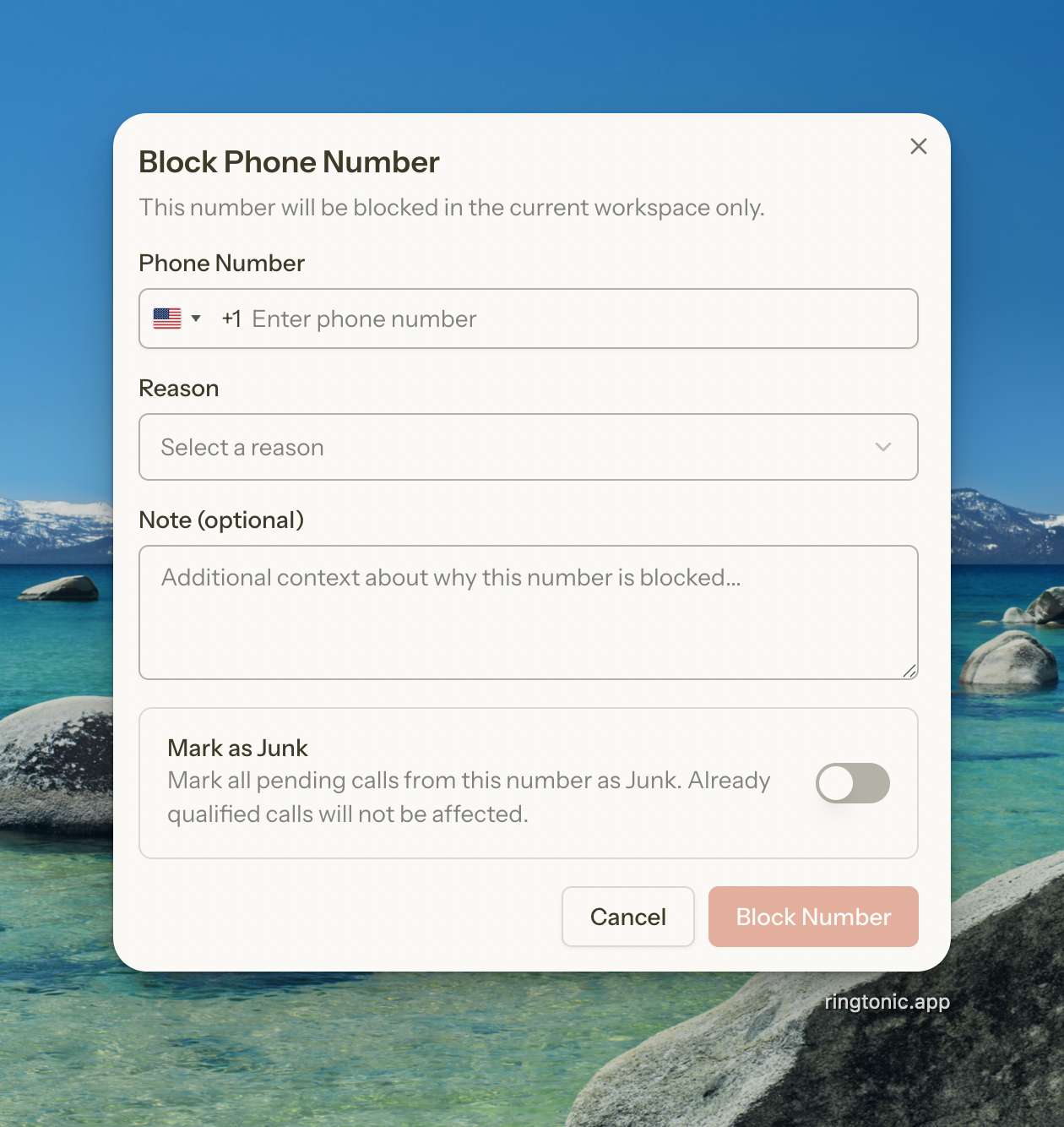
* **Phone Number** — Enter the number to block
* **Reason** — Select a reason (Spam, Harassment, Wrong Number, Telemarketer, Competitor, or Other)
* **Note** (optional) — Add context about why you're blocking this number
* **Mark as Junk** — Toggle this on to automatically mark all existing **pending** calls from this number as Junk. Calls that have already been qualified will not be affected.
Click **Block Number** to confirm.
Block number dialog with phone number, reason, and note fields
{% endstep %}
{% endstepper %}
### Block Reasons
| Reason | Description |
| --------------- | ------------------------------------------------ |
| Spam / Robocall | Automated or junk calls |
| Harassment | Threatening or abusive callers |
| Wrong Number | Persistent misdials |
| Telemarketer | Unwanted sales calls |
| Competitor | Suspected competitor calling your tracking lines |
| Other | Any other reason |
***
## Blocking from Call Logs
You can block a caller directly from the call logs table without navigating to the Blocked Numbers page.
1. Find the call in your call logs
2. Click the row actions menu (three dots)
3. Select **Block Caller**
4. The block dialog opens pre-filled with the caller's phone number
{% hint style="success" %}
When blocking from a spam-filtered call, the reason is automatically pre-selected as "Spam" to save you time. You can also toggle **Mark as Junk** to clean up all pending calls from that number at the same time.
{% endhint %}
***
## Importing Blocked Numbers
If you have a list of numbers to block, you can import them in bulk via CSV.
{% stepper %}
{% step %}
**Download the Template**
Click **Import CSV** on the Blocked Numbers page, then click **Download template** to get a pre-formatted CSV file.
The template has three columns:
```
phone_number,reason,note
+14155551234,spam,Known robocaller
+14155559876,telemarketer,
```
{% endstep %}
{% step %}
**Fill In Your Numbers**
* **phone\_number** (required) — The number to block in E.164 format
* **reason** (optional) — One of: `spam`, `harassment`, `wrong_number`, `telemarketer`, `competitor`, `other`. Defaults to `other` if left blank.
* **note** (optional) — Free-text note, up to 500 characters
{% endstep %}
{% step %}
**Upload the File**
Click **Import CSV**, select your file, and click **Import**. Ring Tonic will process the file and report:
* How many numbers were imported
* How many duplicates were skipped
* Any rows with errors
{% endstep %}
{% endstepper %}
{% hint style="warning" %}
The CSV file must be under 2MB. Duplicate numbers (already on the block list) are automatically skipped.
{% endhint %}
***
## Exporting Blocked Numbers
You can export your blocked numbers list to Excel or CSV.
1. On the Blocked Numbers page, click the **Export** button in the table toolbar
2. Choose **Export to Excel** (.xlsx) or **Export to CSV** (.csv)
3. The export is processed in the background — you'll receive an email with a download link when it's ready
The export includes: phone number, reason, note, blocked by, and date blocked.
***
## Viewing Blocked Call Attempts
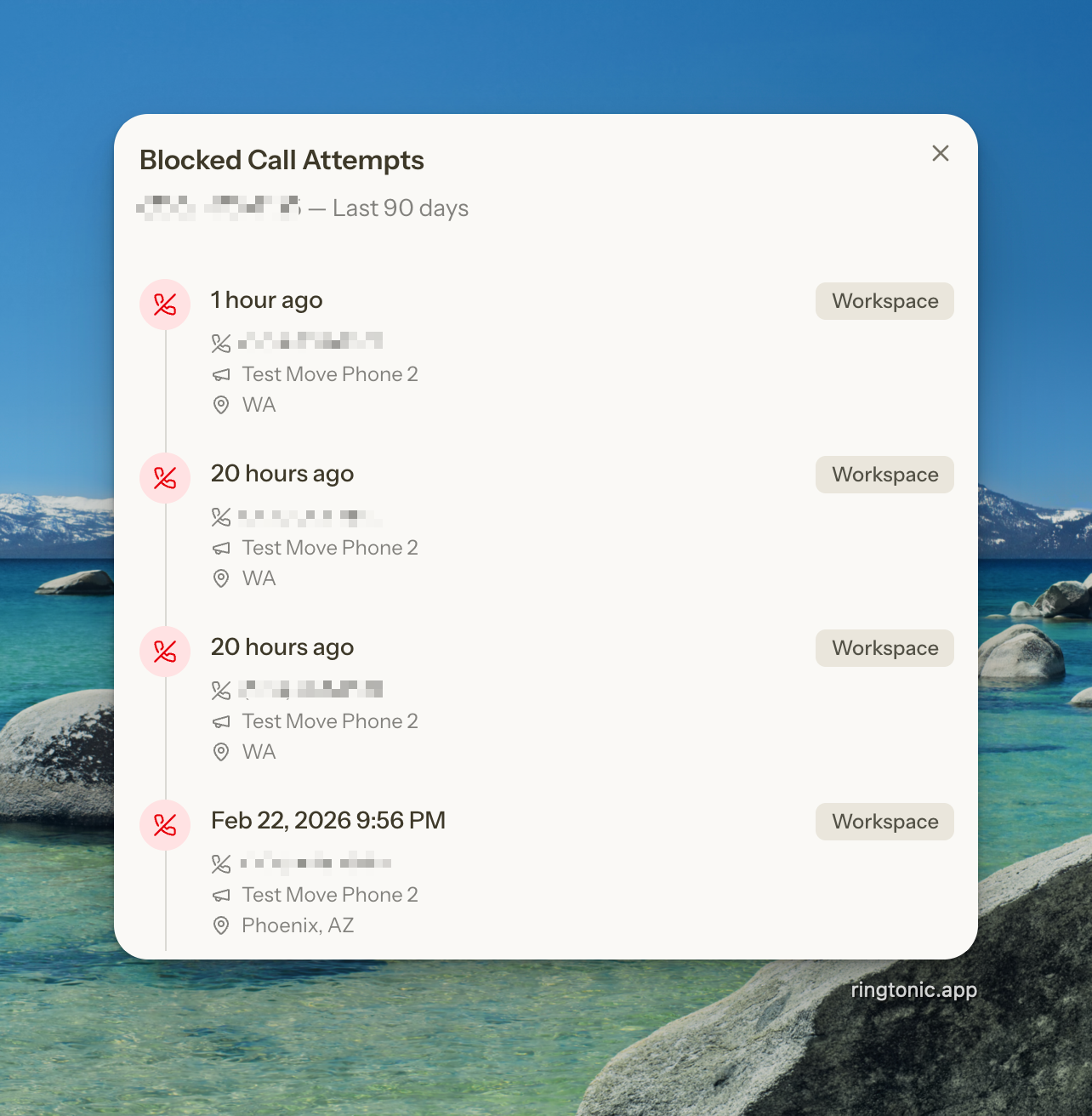
Click any row in the blocked numbers table to open the **Blocked Call Attempts** panel. This shows a timeline of every call attempt from that number in the last 90 days, including:
* **Date and time** of each blocked call
* **Tracking number** that was called
* **Campaign** associated with the tracking number
* **Caller name** (if available)
* **Caller location** (city and state)
* **Block list type** — whether the call was blocked by the workspace or account list
{% hint style="info" %}
Blocked call attempt records are retained for **90 days**. Older records are automatically purged.
{% endhint %}
***
## Unblocking a Number
To remove a number from the block list:
1. Find the number in the blocked numbers table
2. Click the **Unblock** button (shield icon) on the row
3. Confirm by clicking **Unblock** in the confirmation dialog
The number will immediately be able to call your tracking numbers again. Future calls from that number will be processed normally and appear in your call logs.
{% hint style="warning" %}
**Permissions:** Only workspace owners and admins can unblock numbers from the workspace list. Only the workspace owner can unblock numbers from the account list.
{% endhint %}
***
## Outbound Call Blocking
Blocked numbers also affect outbound calls made through the browser dialer. If an agent tries to dial a blocked number, the call will be prevented and an error message is shown with the block reason.
***
## Webhooks
If you have webhooks configured, Ring Tonic fires a `call.blocked` event whenever a blocked call is rejected. This is useful for tracking blocked call volume in external systems.
{% content-ref url="/pages/cYbBeg8dB6cXyXveMyCZ" %}
[Webhooks](/guides/webhooks.md)
{% endcontent-ref %}
***
## Common Questions
Does blocking a number cost anything?
No. Blocked calls are silently rejected before the call connects, so there is no Twilio charge and no impact on your call usage.
Will the blocked caller hear anything?
No. The call is silently rejected. The caller will not hear ringing, a busy signal, or a voicemail greeting.
Can I block area codes or patterns?
Not currently. Blocking is per individual phone number. Area code and pattern-based blocking may be added in a future update.
What happens if a number is on both the workspace and account block lists?
The call is blocked either way. Unblocking from one list does not affect the other — the number must be removed from both lists to allow calls through.
How long are blocked call attempts stored?
Blocked call attempt records are retained for 90 days. Older records are automatically purged.
Is there a limit to how many numbers I can block?
No. You can block an unlimited number of phone numbers on any plan.